“Where are we on that?”Now you always know.
You're answerable for 30 things other people are running. TemporalNotes remembers every update you're given — status, why it's stuck, who owns the next step, when it'll land — flags what has gone quiet, drafts the check-in, and answers the hallway question. Even through Siri.
The hallway test:
Your CEO asks about a project you haven't touched in two weeks. You answer in ten seconds — status, holdup, new date.
No spam. We will only email when it is ready.
Talk to update
Speak naturally. On-device AI extracts goals, owners, and deadlines.
Confirm in seconds
We show only what changed — one tap to approve.
Know who to go ask
When a priority goes quiet past its rhythm, TemporalNotes drafts the check-in — before it bites.
Radar
Needs your attention
Review nowVertex Enterprise Deal
Needs attentionGone quiet
No meaningful update in 19 days — past the weekly cadence. Owner: James.
Globex Escalation
BlockedForward progress is stalled until this clears. Owner: Rita.
Q3 Board Deck
Deadline pressure
The deadline is approaching faster than the work is moving.
All Priorities
16 ›Sound familiar?
Someone asks for status and I know I was told — I just can't find it fast enough.
Half my projects don't have a real PM. If I don't chase them, I hear nothing.
I am tracking too many important things across too many places.
I know things are off track — I just cannot see which ones.
The personal layer your other tools do not give you.
Not another task list. Not another team system. TemporalNotes is for the priorities you are personally accountable for — the ones that live across email, meetings, notes, and memory.
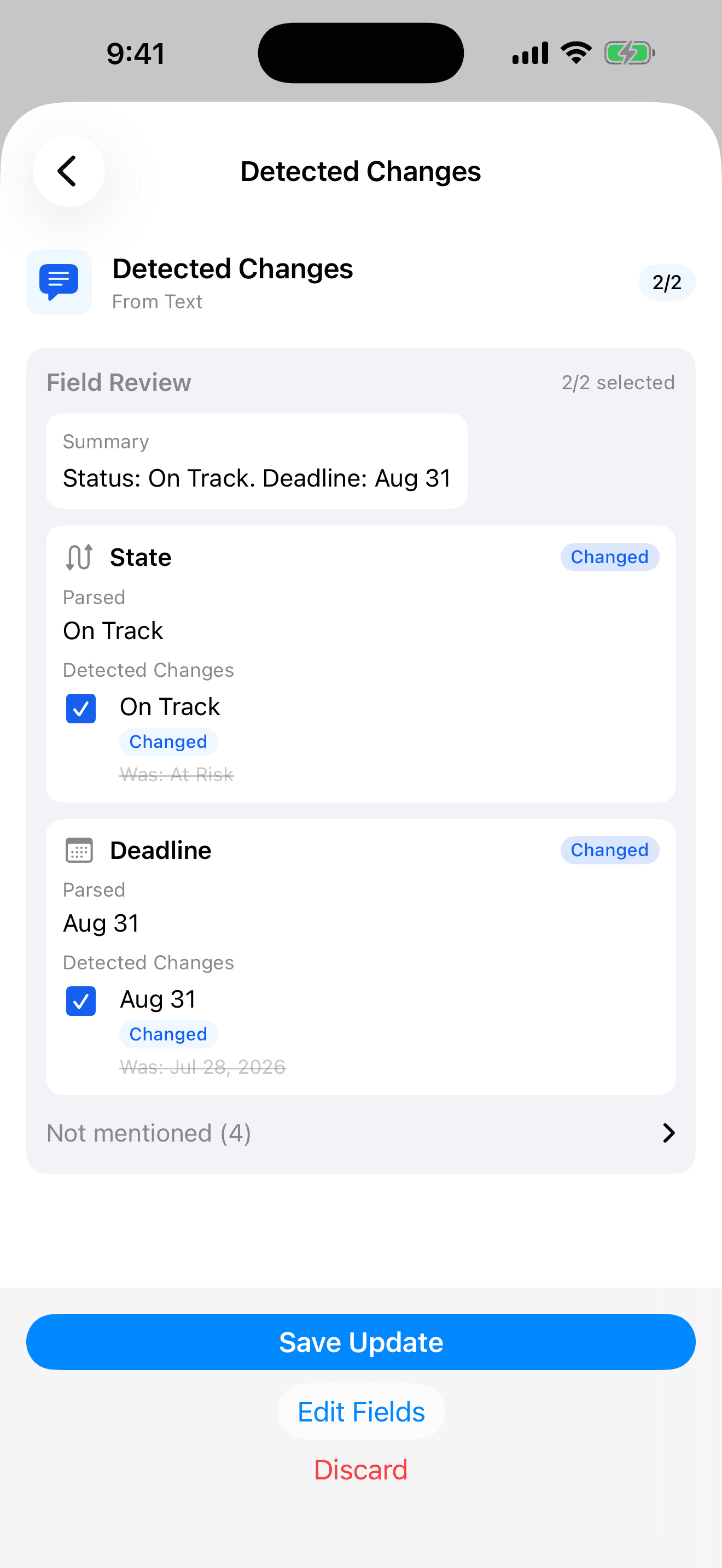
Talk to update. Confirm in seconds.
Speak a quick update after any call or meeting. On-device AI extracts status, owners, deadlines, and risks automatically — no forms to fill. Speak it, confirm the diff, done.
You speak
“Good news on Acme Corp — procurement signed the order form. We're back on track, and the new go-live is August 31.”
Why this matters
Most update tools force you to find the right project, open the right field, and retype information you already said out loud. TemporalNotes captures it from speech and shows you only the diff — what moved, what changed, what is new.
All transcription and parsing happens entirely on your device. Your words never leave your phone.
Private by design
No API keys. No network calls with your transcripts. No training data from your content. Because nothing leaves the device, it's built for people who handle confidential material — deals, personnel, legal.
Before the meeting — or in the hallway — get the position, instantly.
Every status question is really asking four things: where it stands, why it is held up, who owns the next step, and when it lands. TemporalNotes keeps all four current for every priority you track.
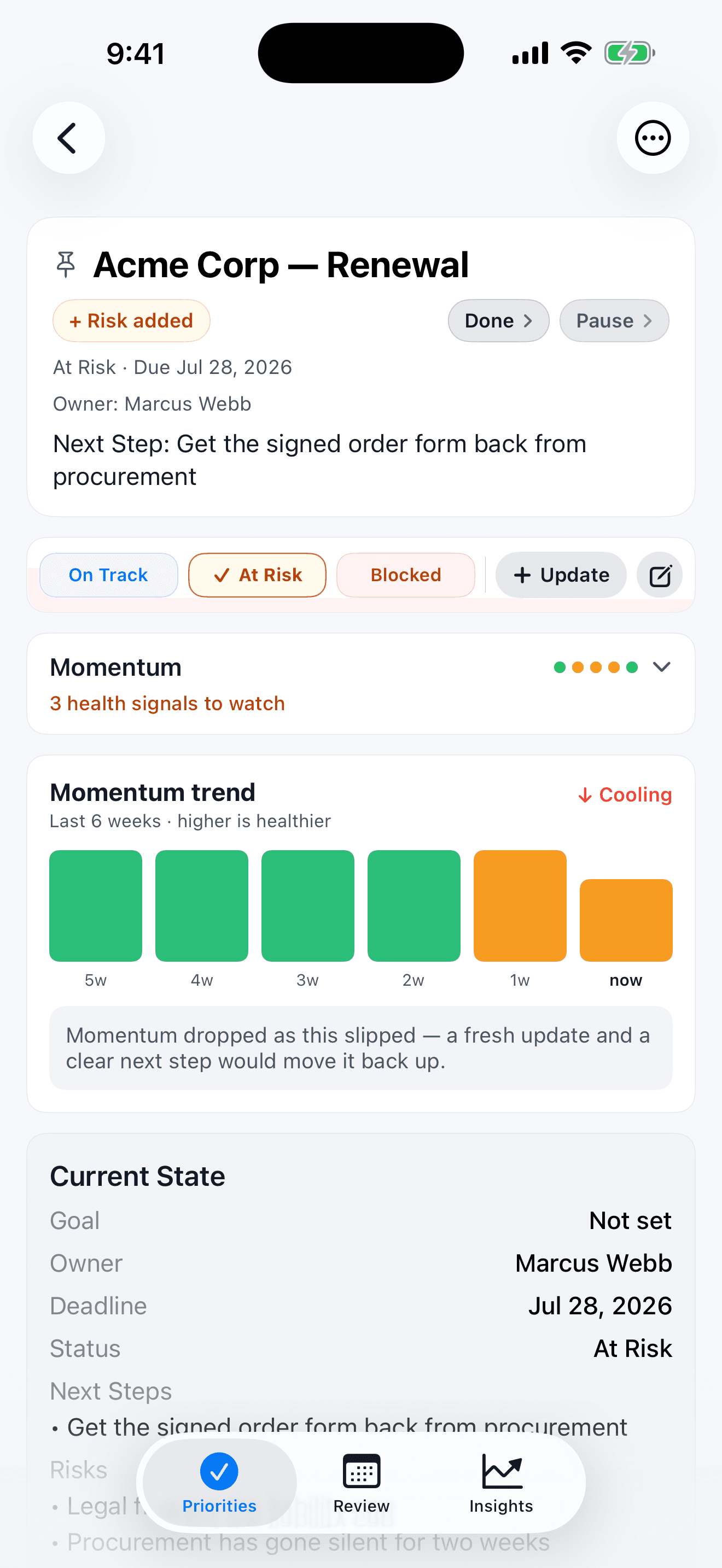
On screen
The current status, the reason for the holdup, the owner of the next step, and the date — assembled on your device from the updates you captured.
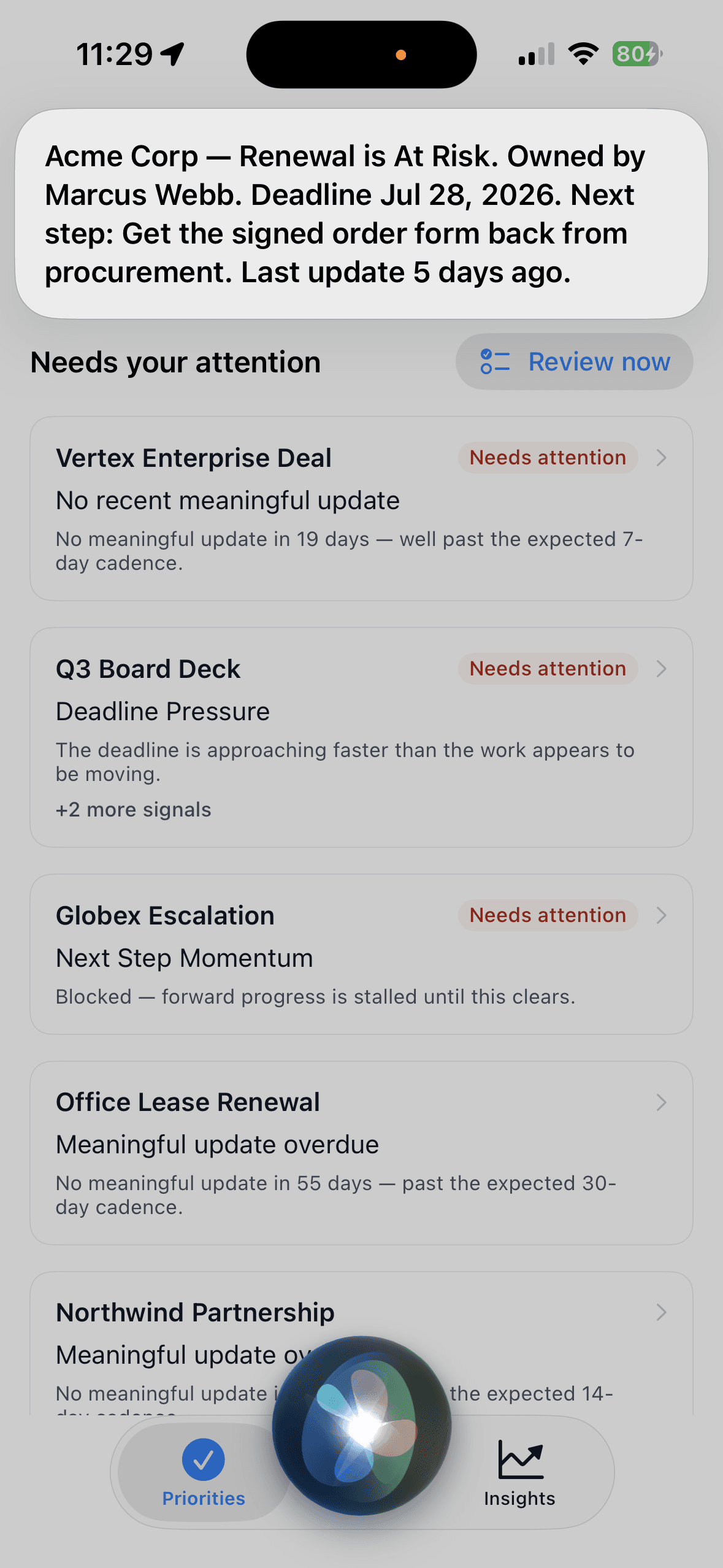
Out loud, via Siri
Or don't open the app at all — ask, and get the position read back: status, owner, deadline, next step, with your phone still in your pocket.
Not just what needs attention. Why.
Every priority answers five plain questions — updates, deadline, direction, risks, and ownership. Each is green, amber, or red, with the one sentence that explains it and the one tap that fixes it. No scores to decode — just the reason, the way you'd say it out loud.
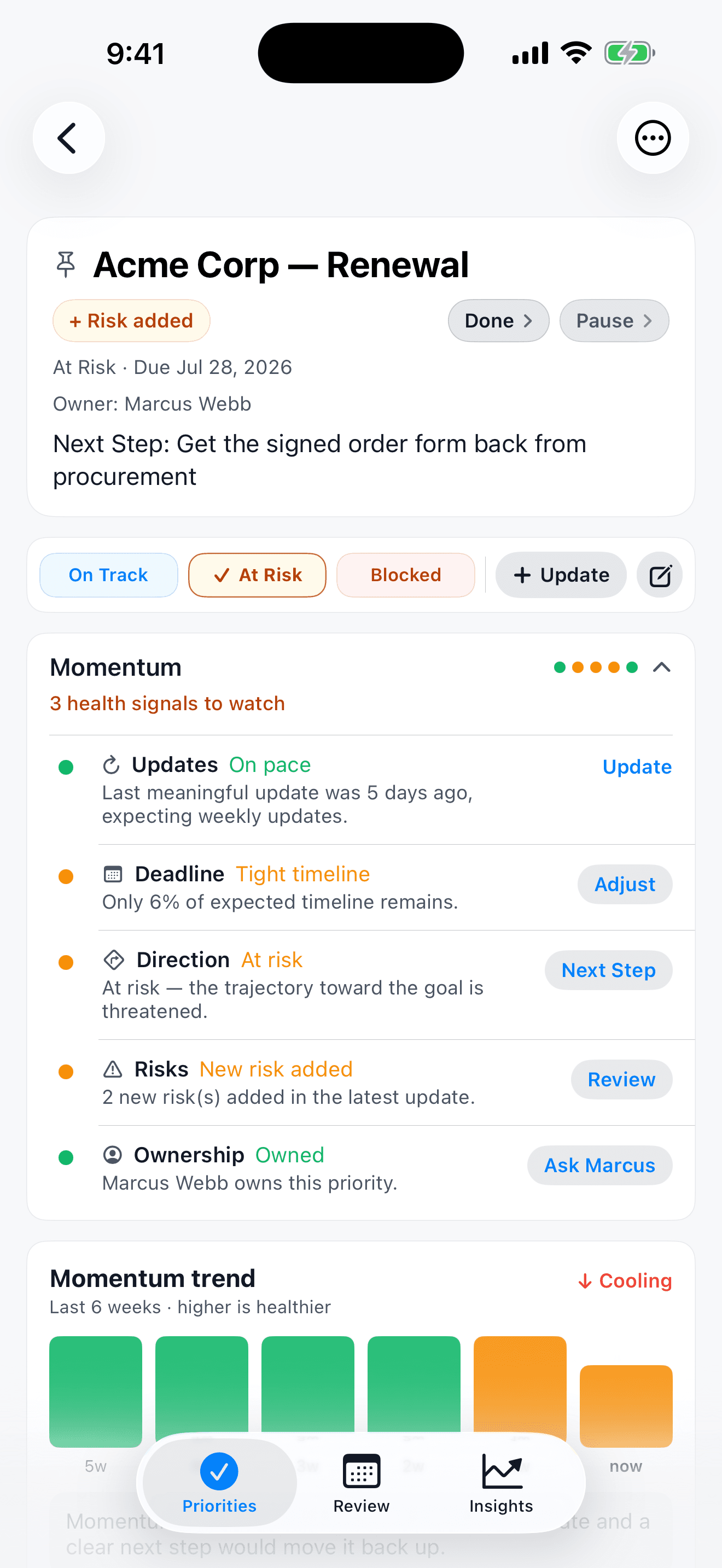
See which way it is heading
Each priority shows a simple six-week trend — warming or cooling — reconstructed from your own update history. “Momentum dropped as this went quiet; a fresh update would move it back up.”
And across everything you track
When you want the portfolio view, the same five signals roll up across all your priorities — how many are slipping on each, and whether that is better or worse than last week.
Plain language, not a dashboard
No gauges, no numbers to interpret. It is deliberately five short sentences and three colors — the reason you would give if someone asked.
It notices the silence — and writes the check-in.
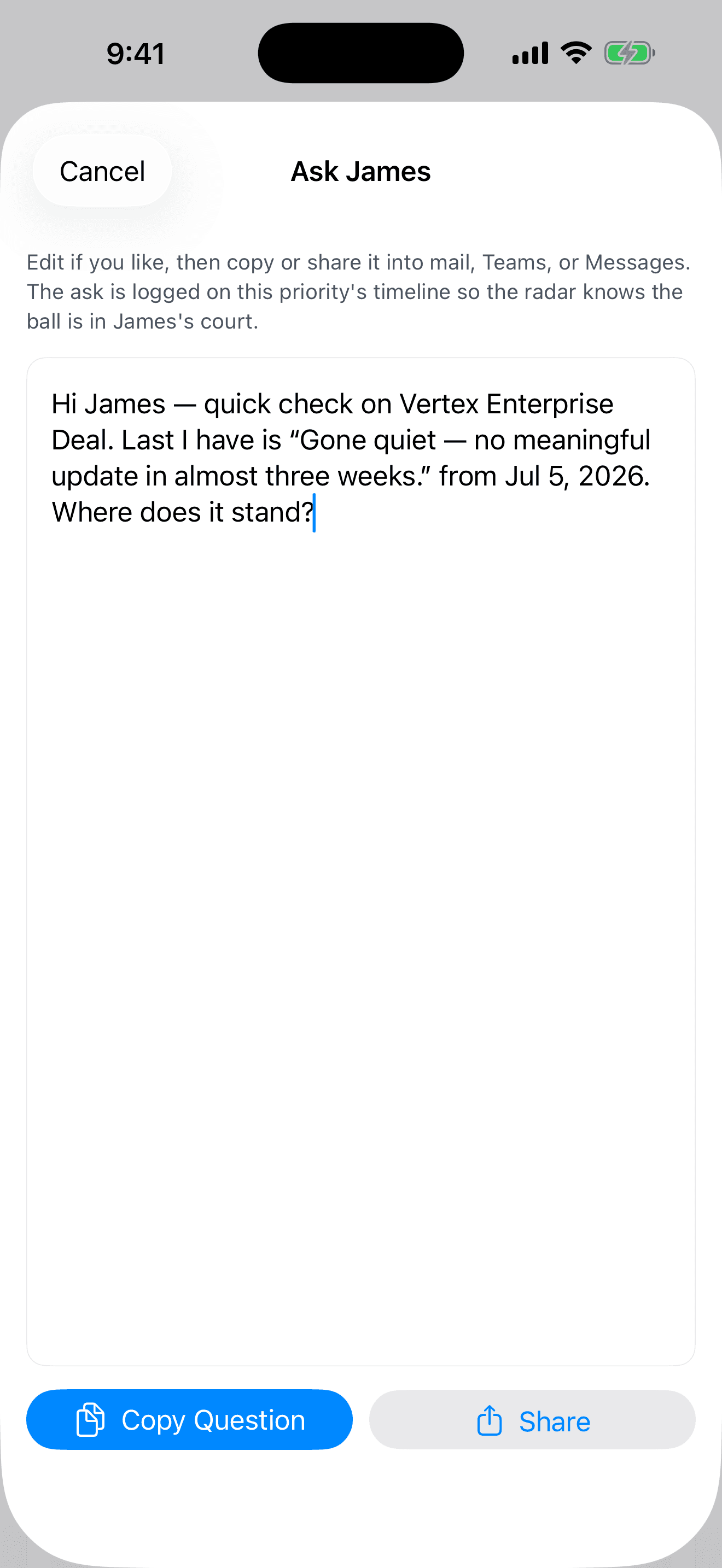
Every priority has an expected rhythm. When one goes quiet past it, TemporalNotes surfaces it — and drafts the question for you, built from what you already know: the last update, the deadline, the ask.
When Vertex Enterprise Deal goes quiet past its weekly rhythm, TemporalNotes surfaces it and drafts the check-in for you — addressed to the owner, built from the last update, the date, and the ask.
You send it from your own mail, Teams, or Messages — TemporalNotes never sends anything itself, which is exactly why it works inside any corporate IT perimeter, with nothing to install and no one to convince. And it remembers you asked: if nothing comes back, it tells you you are still flying blind.
More than half of projects aren't run by professional project managers (Wellingtone, State of Project Management). Those are the ones that go quiet.
Read the research: The Answerability Gap — why this problem exists, and the psychology of the fix →
Do your weekly review on the drive to work.
The weekly review is now a guided walkthrough: TemporalNotes brings you one priority at a time, tells you exactly why it needs a look, and you handle it on the spot — update it, move the date, note a risk, mark it done. A few minutes and you are clear.
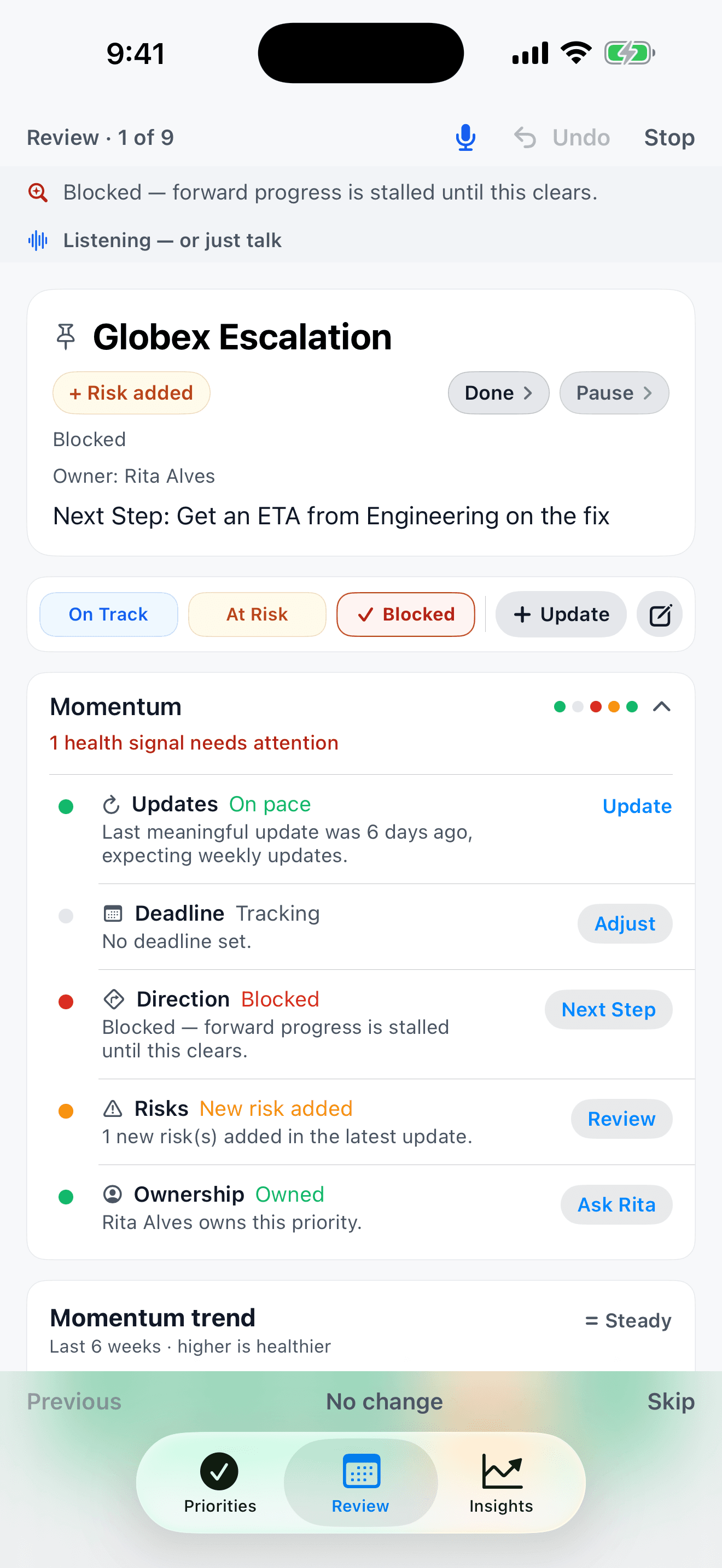
The guided walkthrough
One priority at a time, with the reason it needs a look. Answer out loud, or tap.
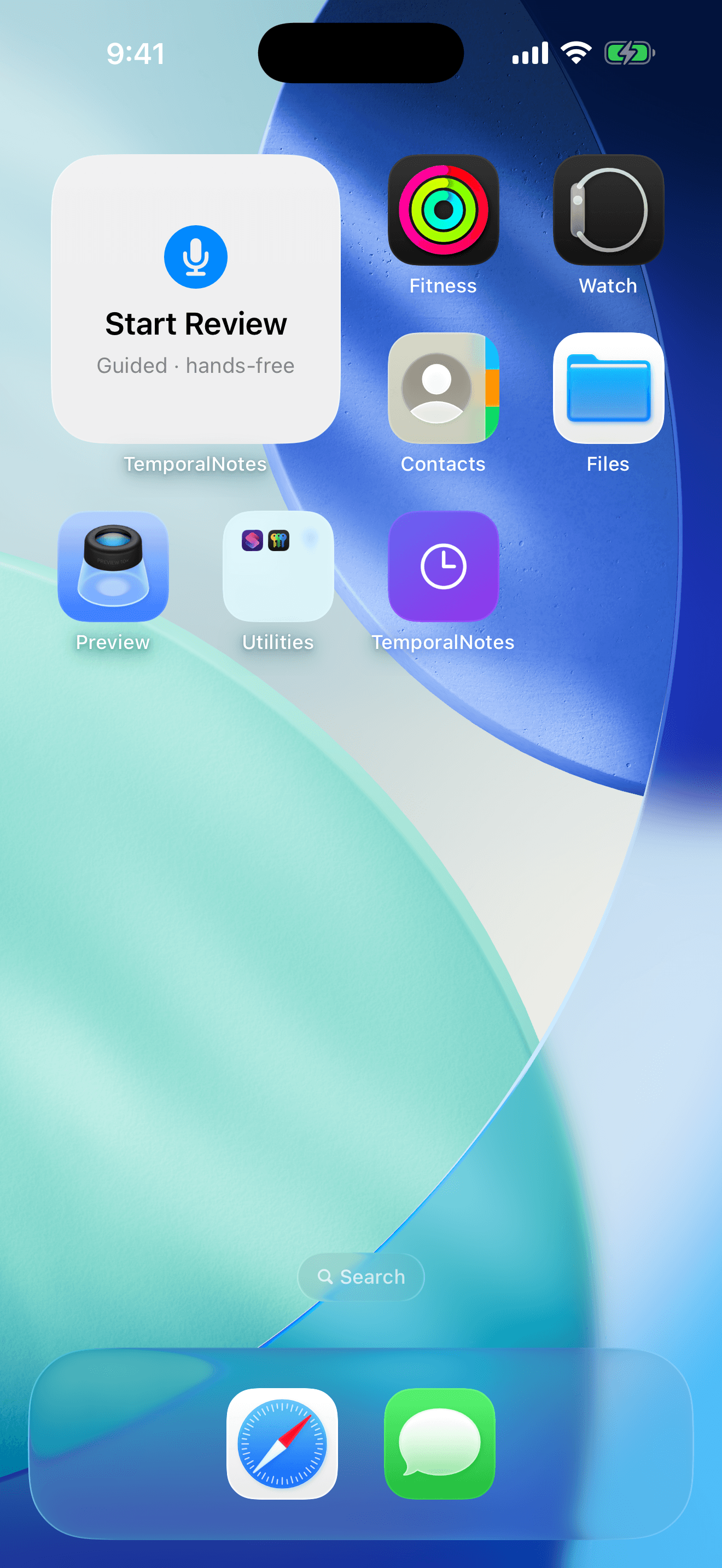
One tap to start
Launch from a Home Screen widget — or the CarPlay dashboard's widget page.
Just say the word
The app speaks each priority and why it needs a look; you answer out loud or give a quick command, and it captures and moves on.
Eyes-free in the car
It runs hands-free through your car's speakers and microphone over Bluetooth. Say “start my weekly review” to Siri and go.
Your speech is processed on your device, the same as everywhere else in the app.
Already in your stack?
Good. TemporalNotes is not a replacement. It is the personal layer above all of them.
Your tool
Your system of record
Gives you
Pipeline data
Does not give you
A personal executive view
Your tool
Your task app
Gives you
Task lists
Does not give you
Portfolio risk view
Your tool
Spreadsheets
Gives you
Flexibility
Does not give you
Signal, alerts, and intelligence
Your tool
Your team tool
Gives you
Team workflow
Does not give you
Your individual awareness layer
Dashboards, PPM suites, and standardized status templates all require your organization to adopt them. TemporalNotes requires exactly one person to change: you. A few seconds at a time.
Spot patterns before they become crises.
The on-device AI watches for behavioral patterns humans routinely miss — and alerts you before the window to intervene closes.
The Stalled Loop
Priorities stuck in "Waiting" with no real forward progress — even when updates keep arriving.
Risk Fade
Critical risks that appeared in one update and quietly vanished from the next — without resolution.
Goal Drift
Priorities that have run past their expected timeline while the original goal has silently shifted.
Watermelon Status
Green on the outside until it suddenly flips red. Status regressions, fading risks, and "almost done" loops get noticed before the flip.
Built for people personally accountable for 20+ active priorities
Chief of Staff
You are the answer desk for the exec team. Track every workstream you are expected to speak to — including the ones with no PM.
Program & portfolio oversight
A dozen workstreams with uneven reporting — see status, holdups, and the quiet ones in a single radar.
Executive follow-up
Board commitments, strategic initiatives, and the projects that report to you unevenly — tracked in one place.
Founder ops
Fundraising, launches, partnerships — all in one personal radar.
Deals and pipeline
30 open deals across the team — know which need a push before they go cold.
Client commitments
5 active clients — spot which engagement is off track before they notice.
Hiring pipeline
Multiple roles in flight — see which positions have stalled.
Legal and compliance
Contract deadlines, renewals, filings, and negotiations — know what is coming up before it becomes urgent.
Speak it. Paste it. Snap it.
However an update reaches you — a call, an email, a whiteboard, a hallway conversation — capture it in seconds. Voice first, no forms ever.
See it in action.
The radar that opens to what needs you, the portfolio view when you want the whole picture, and the same calm layout on iPad.
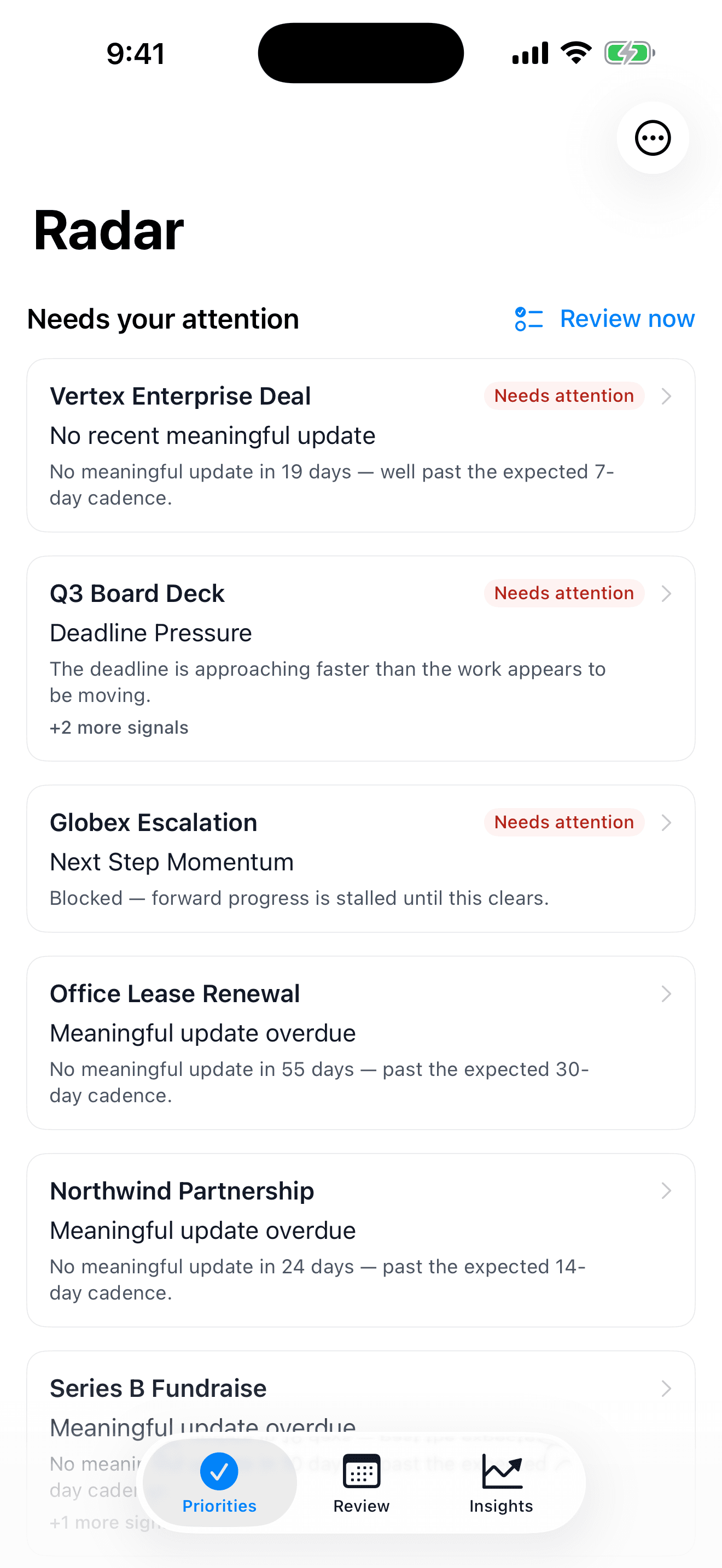
The radar
Opens to what needs you — each card says why it is there.
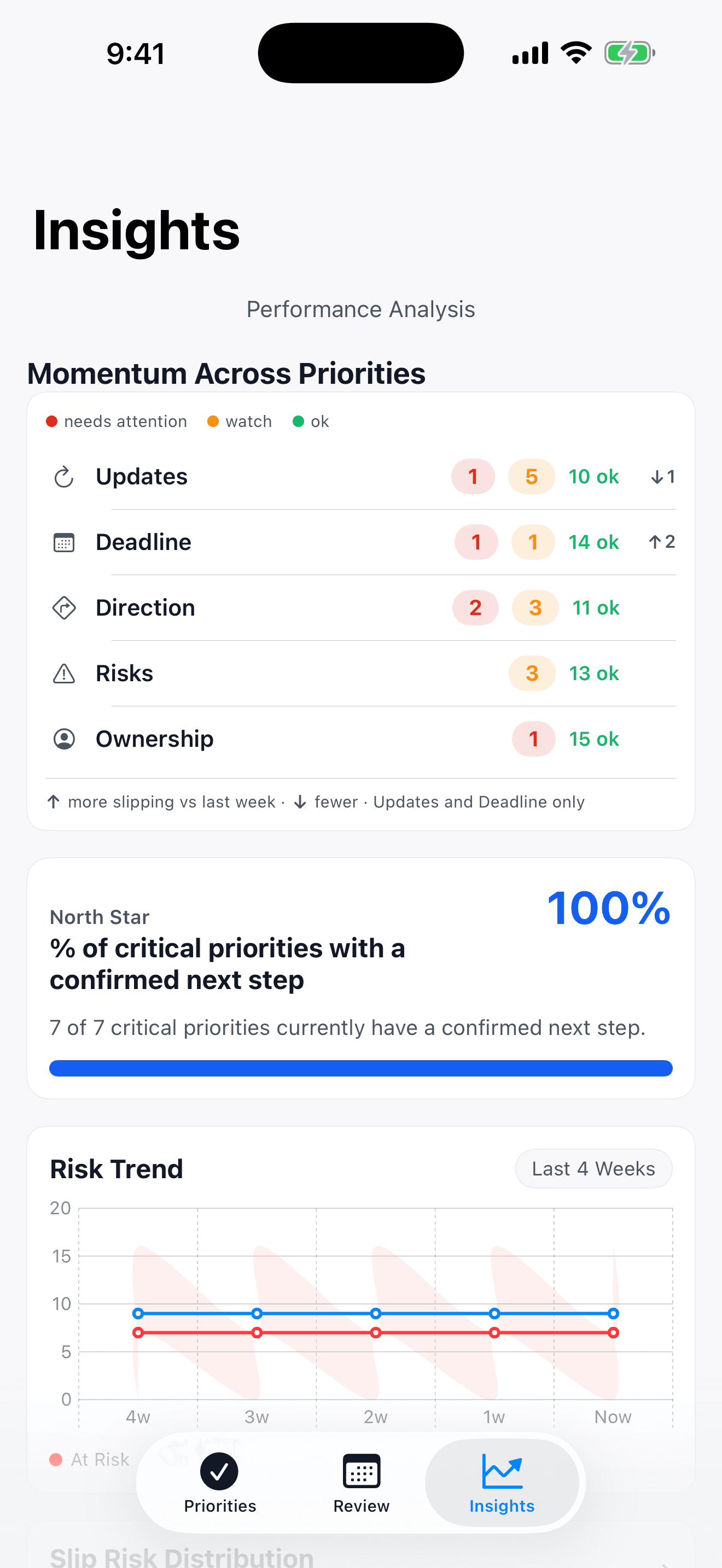
The portfolio view
The same five signals, rolled up across everything you track.
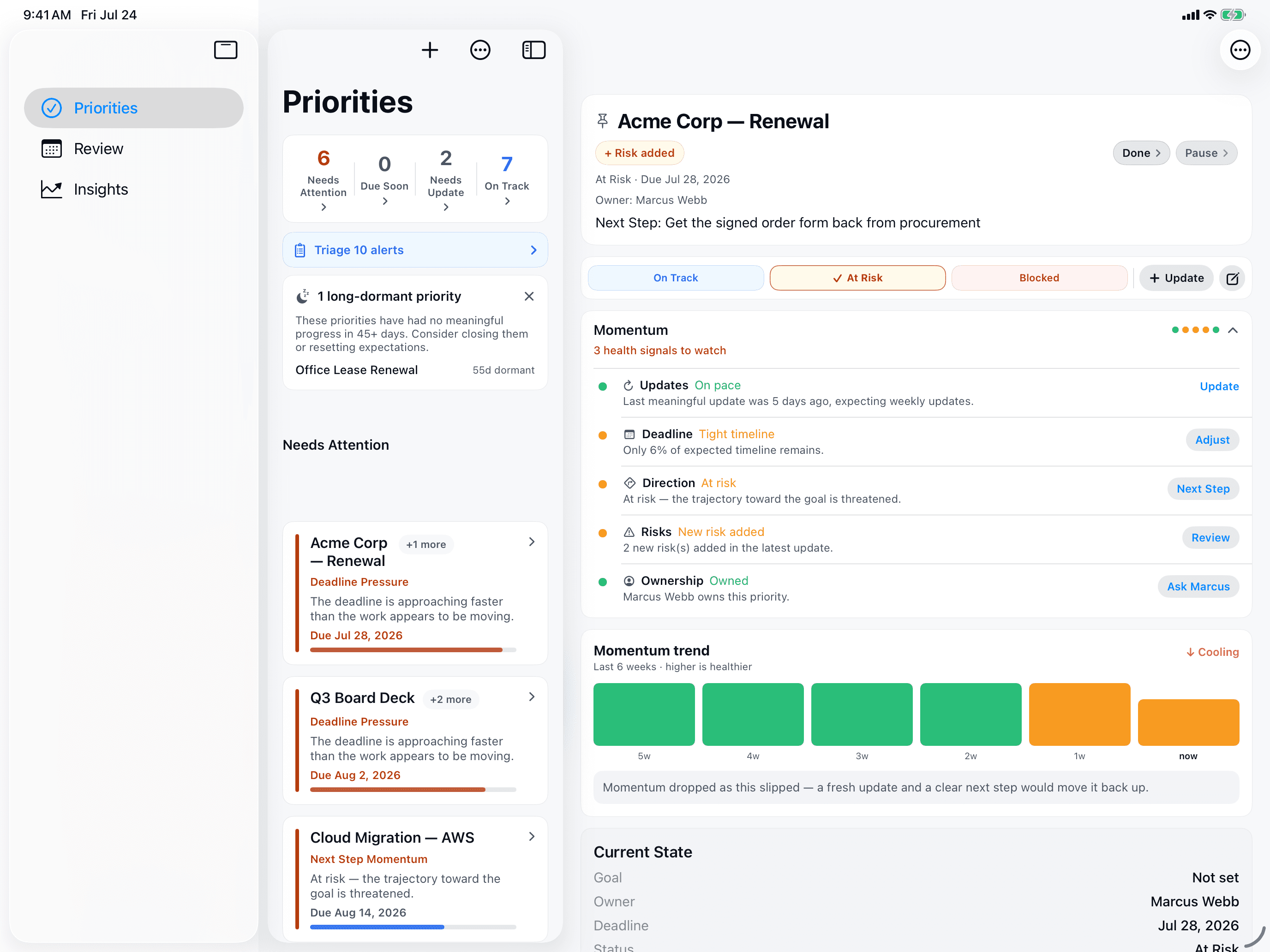
Room to think on iPad
The list and the full priority, side by side. Universal app — iPhone and iPad, one purchase.
Private by default
Executives put sensitive deals, personnel decisions, and strategic plans into this app. We designed it so none of that ever leaves your device.
On-device AI — always
Transcription and parsing run locally. No API keys, no network calls containing your content.
No accounts, no servers
Start immediately. We have no servers that receive your data — because we don't have any.
Private iCloud sync
Optional sync via your own CloudKit database. We have no access to your iCloud data.
Early access is free during private beta.
We are inviting a small number of people who manage 20+ active priorities across meetings, email, notes, and memory. No credit card. No spam. Just early access in exchange for honest feedback.
Private beta
Free
TemporalNotes is currently free for a small group of early users who are actively managing 20+ priorities. No credit card. No spam.
Early users receive free beta access and preferred pricing at launch.
Planned public pricing
One simple plan. All features included.
Pricing may change before launch. Active beta contributors receive 12 months free after launch.
TemporalNotes requires an iPhone or iPad running iOS 26 or later. Its AI runs entirely on your device — a one-time ~1.2 GB model download over Wi-Fi — so nothing you capture is ever sent anywhere to be processed.